Canva Invitation: A Designer's Secret to Realistic Mockups
Every designer, entrepreneur, or creative hobbyist knows the struggle. You’ve poured hours into crafting the perfect wedding invitation or a stunning birthday card. The colors are right, the typography sings, and the layout is flawless. But when you go to present it to a client or share it on social media, a flat digital file just doesn’t do it justice. It lacks context, depth, and that tangible, real-world feel that makes people stop scrolling. This is the gap between a good design and a presentation that truly sells the experience. The Canva Invitation & Card Mockup bundle is built specifically to bridge that gap, offering a practical, elegant solution for anyone using Canva as their primary design tool.
Beyond Flat Files: The Power of Contextual Presentation
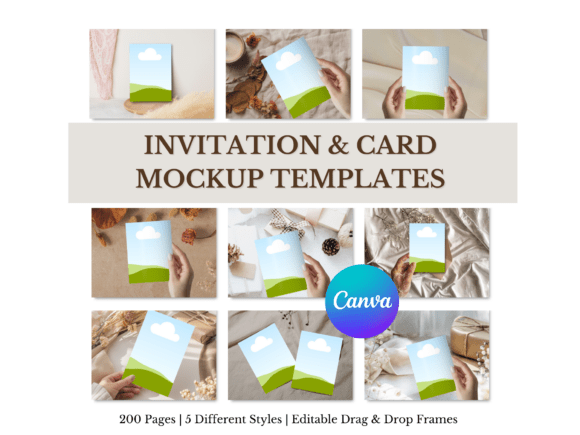
Think about the last time you saw a beautifully styled photo of a wedding invitation suite on Instagram. It wasn't just the card; it was the textured linen backdrop, the sprig of eucalyptus, the soft natural light, and perhaps a wax seal. That scene tells a story. It evokes emotion and helps the viewer imagine holding that very invitation in their hands. This is the core principle of effective mockup templates. They transform your digital artwork into a believable physical product. This particular bundle provides 200 editable pages across five distinct styled scenes, moving you from a simple graphic to a full editorial spread in minutes. It’s not about adding fluff; it’s about enhancing your design’s perceived value and professionalism.
The real advantage here is the seamless integration with Canva’s native drag-and-drop interface. There’s no need to learn complex software like Photoshop or fiddle with smart objects and clipping masks. You simply open the template in Canva, locate the designated frame for your design, and drag your invitation or card file right into it. The perspective, lighting, and shadows of the scene are already set, so your artwork automatically looks like it belongs there. This accessibility is a game-changer for small business owners and content creators who need to produce high-quality marketing assets quickly without outsourcing. It democratizes professional presentation, putting the tools of high-end brand identity work into the hands of everyone.
Practical Applications for Real-World Projects
Where does a resource like this truly shine? The applications are broader than you might first consider. For a wedding stationer, these mockups are essential. Instead of sending a client a PDF proof, you can present their custom invitation suite in a romantic, styled scene that helps them visualize the final product. This can increase client confidence and reduce revision rounds. For a greeting card designer selling on Etsy or at craft fairs, mockup images are the lifeblood of your shop listings. A card photographed on a wooden table with a coffee mug sells a feeling, not just paper and ink. This bundle gives you the variety needed to keep your shop visuals fresh and engaging.
Beyond direct product presentation, think about your broader marketing graphics. A blogger can use a mockup of a printable art piece in a styled home office scene to promote a new digital download. A marketer for a boutique brand can showcase a new packaging design concept in a lifestyle setting before it goes to print. The consistency of having five different scenes allows you to maintain a cohesive visual language across your Instagram feed, Pinterest pins, and website banners. You’re not just showing a design; you’re building a world around your brand identity. The scenes themselves—likely ranging from minimalist to rustic to luxurious—act as a neutral yet stylish backdrop, ensuring your design remains the hero.
Maximizing Your Investment: Tips and Considerations
To get the most out of this design asset, a little strategic thinking goes a long way. First, choose your scene with intention. A delicate, floral baby shower invite will look best in a soft, light-filled scene, not a dark, moody industrial setting. Let the style of your invitation dictate which of the five scenes you use. Second, pay attention to scale and placement. While the drag-and-drop function is simple, take a moment to ensure your design is centered and proportional within the frame. Sometimes, a slight adjustment in position can make the final image look more natural.
Third, leverage the variety. Don’t just use one mockup for all your social media posts. Rotate through the different scenes and angles to create visual interest and showcase different aspects of your work. If you have a suite with multiple pieces (invitation, RSVP card, details card), you can create a cohesive carousel post by placing each piece in a similar but distinct scene from the bundle. Finally, remember that the goal is to complement your design, not overshadow it. The mockup scene should enhance and contextualize, allowing the typography, color palette, and layout of your invitation or card to communicate clearly. This thoughtful approach ensures your presentations are not only beautiful but also strategically effective, whether you’re a designer seeking new clients or a crafter selling your latest creation.